How Does FBR Real-Time Invoice Reporting Work?
As part of its digital transformation and transparency initiatives, the Federal Board of Revenue (FBR) has launched a real-time invoice reporting system for businesses. But how exactly does this system operate behind the scenes?
Let’s break down the full process from invoice creation to FBR verification.
Step-by-Step Process of Real-Time Invoice Reporting
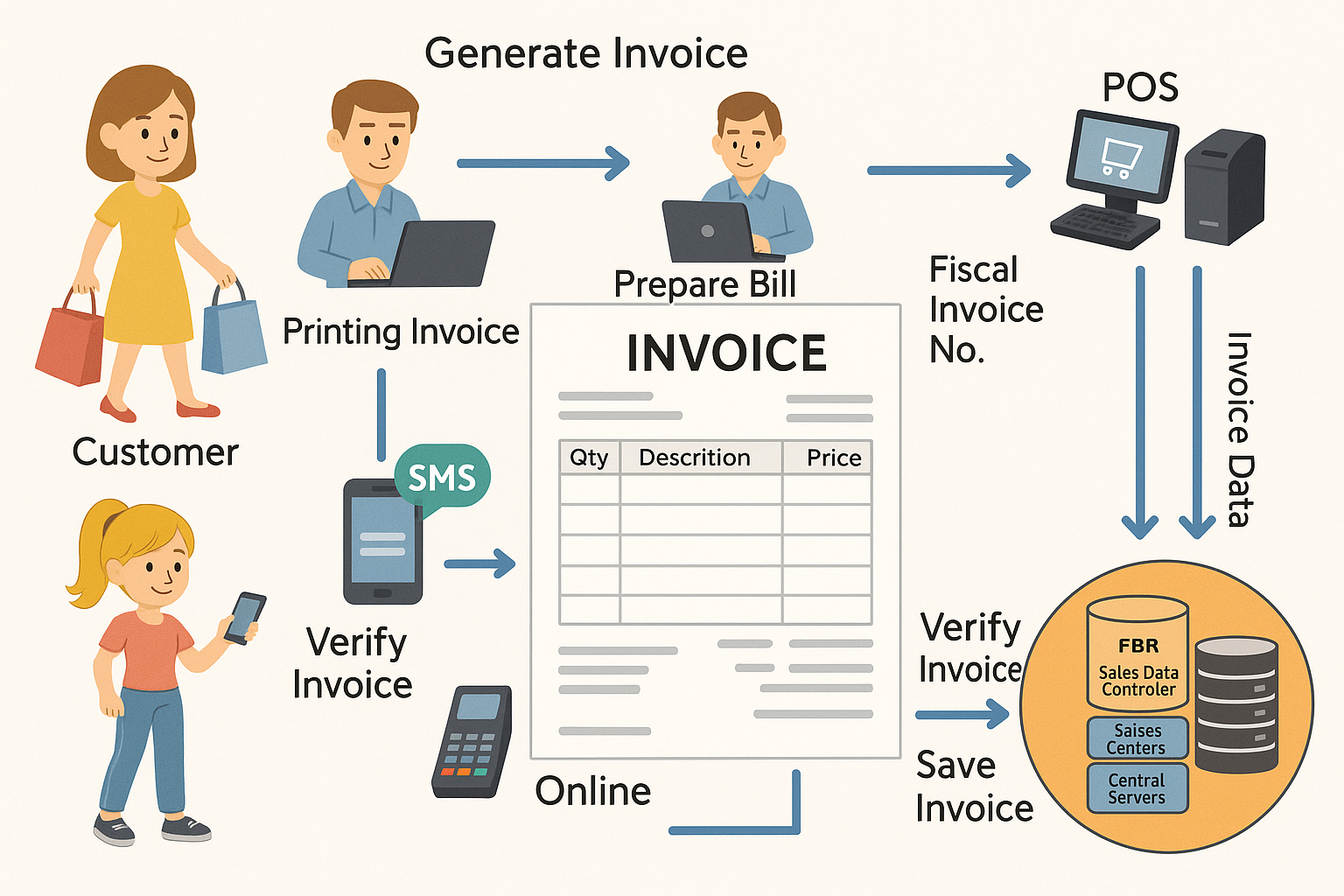
1. Integration of POS with FBR System
Businesses first integrate their Point of Sale (POS) software with the FBR’s central server. This connection allows the POS system to communicate with FBR instantly every time an invoice is generated.
FBR provides an API (Application Programming Interface) for this connection.
2. Generating the Invoice
When a customer makes a purchase, the business generates a digital sales invoice through their POS system. The invoice includes:
Business name and NTN/STRN
Date and time of transaction
Product details and quantity
Total amount and tax applied
Customer details (optional for most retail sales)
3. Sending Invoice to FBR in Real-Time
As soon as the invoice is created, it is automatically transmitted to the FBR’s servers through the internet. This is done in real-time, meaning there’s no manual uploading or delays.
The data is encrypted and sent securely via the official FBR API.
4. FBR Verification and Response
The FBR system receives the invoice and validates it using its rules:
Is the business properly registered?
Is the tax calculated correctly?
Are the invoice contents valid?
Once verified, the FBR system sends back a unique FBR Invoice Number and QR code, which is embedded into the original invoice.
5. Printing or Displaying the Verified Invoice
The POS system then prints or shows the verified invoice with the official QR code. This serves as proof that the transaction has been recorded with FBR.
Customers can scan the QR code using the FBR Tax Asaan App to:
Confirm invoice authenticity
Earn chances to win rewards (in applicable campaigns)
Report fake or non-verified invoices
6. Storing and Managing Invoice Records
The business retains a copy of the verified invoice for:
Monthly tax filing
Record keeping
Audit purposes
FBR also stores this invoice in its central system for monitoring, data analysis, and tax compliance checks.
Why Is This Important?
It prevents tax evasion by ensuring every sale is accounted for.
It creates a digital audit trail for transparency.
It helps businesses maintain accurate, auto-verified records.
It empowers customers to verify transactions on their own.
Technical Requirements for Integration
To successfully implement this system, businesses need:
A POS system compatible with FBR’s API
A stable internet connection
A valid Sales Tax Registration Number (STRN)
Technical support (usually provided by a software vendor or integration partner)
Conclusion
FBR’s real-time invoice reporting is a smart, secure, and seamless system designed to ensure tax transparency and accountability. By digitally verifying every sale, it strengthens the economy, builds public trust, and helps businesses operate more efficiently.
If you’re a Tier-1 retailer or a notified business, integrating your POS system with FBR is not just a legal obligation—it’s a smart business move.